Introduction: The Digital Revolution of Land Records in West Bengal
For decades, property ownership in West Bengal was a labyrinth of physical ledgers, long queues at the BL&LRO, and the constant shadow of middleman interference. Today, that has been replaced by a transparent, high-efficiency digital ecosystem. Banglarbhumi is the official web portal of the Land & Land Reforms and Refugee Relief and Rehabilitation Department, Government of West Bengal.
Developed and maintained by the National Informatics Centre (NIC), this portal serves as the backbone of the state’s land administration. Its primary mission is to provide transparency and reduce the incidence of fraudulent transactions—a critical issue in real estate. Statistics show that landing pages targeting transactional keywords on this portal can achieve conversion rates of 2-5%, reflecting a highly engaged user base that trusts the government’s digital data over unverified third-party listings. As a land consultant, I can tell you that “knowing your property” via this portal is no longer an option; it is a legal and financial necessity for every homeowner and investor in 2026.
What is Banglarbhumi? Understanding the Portal’s Core Functions
Banglarbhumi is more than just a website; it is an integrated monitoring and service delivery system. It acts as a bridge between the citizen and the Directorate of Land Records & Surveys.
Primary Services and Their Strategic Importance:
- RoR (Record of Rights): Often called the “Porcha,” the RoR is the definitive legal document containing the history of how an owner acquired land rights. It records every property transaction over time, providing a “chain of title” that is vital for bank loans and legal disputes.
- Plot Information and Maps: Users can view digital versions of Mouza Maps, identifying plot boundaries and land classifications (e.g., Bastu, Danga, or Sali).
- Mutation (Transfer of Title): The portal facilitates the legal transfer of property ownership in the government’s “Record of Rights” following a sale, gift, or inheritance.
- Warish Application: A critical service for legal heirs. This allows for the recording of names in the Khatian following the death of the original owner.
- Land Conversion: The formal process of changing land use, such as converting agricultural land for residential or commercial purposes.
- Thika Tenancy: Specifically for the 100 wards under the Kolkata Municipal Corporation (KMC) as per the 2001 Act, this service manages specific tenancy rights in urban areas.
- No Due Certificate: A digital service allowing owners to prove that all land revenue (Khajna) has been cleared.
Getting Started: Sign-Up and Profile Creation
To access the full suite of “Citizen Services,” you must have a registered profile. The registration process is designed to verify your identity and ensure that administrative actions are tied to a real person.
Step-by-Step Registration Guide:
- Access the Portal: Navigate to banglarbhumi.gov.in.
- Initiate Sign-Up: Click on the ‘Sign Up’ button at the top of the homepage.
- The Public Registration Form: You will see a dropdown for ‘User Type’.
- Citizen: Choose this for all standard property searches, mutations, and payments.
- Brick Field User: This is a specialized category. If you operate a brick kiln, you must select this to access the Brick Field Monitoring System, which tracks the quantum of earth used for royalty and cess assessment.
- Personal Information: Fill in your First, Middle, and Last Name. You must provide a Guardian Name and your full Address.
- Administrative Details: Select your Municipality, P.S. (Police Station), District, and PIN Code.
- Dual Verification: Enter your Email and Mobile Number. You will receive two separate OTPs. This “two-factor” verification is essential for securing your land data.
- Finalize: Create a strong password, enter the Captcha, and click ‘Submit’.
Pro-Consultant Tip: Ensure the name you use for registration matches your Aadhaar card exactly. Mismatched names can lead to “Authentication Failures” during later stages of mutation or Khajna payment.
How to Check Khatian and Plot Information (Know Your Property)
One of the portal’s most user-friendly features is the ability to search basic records without logging in. This is perfect for initial due diligence when considering a property purchase.
Steps for Instant Verification:
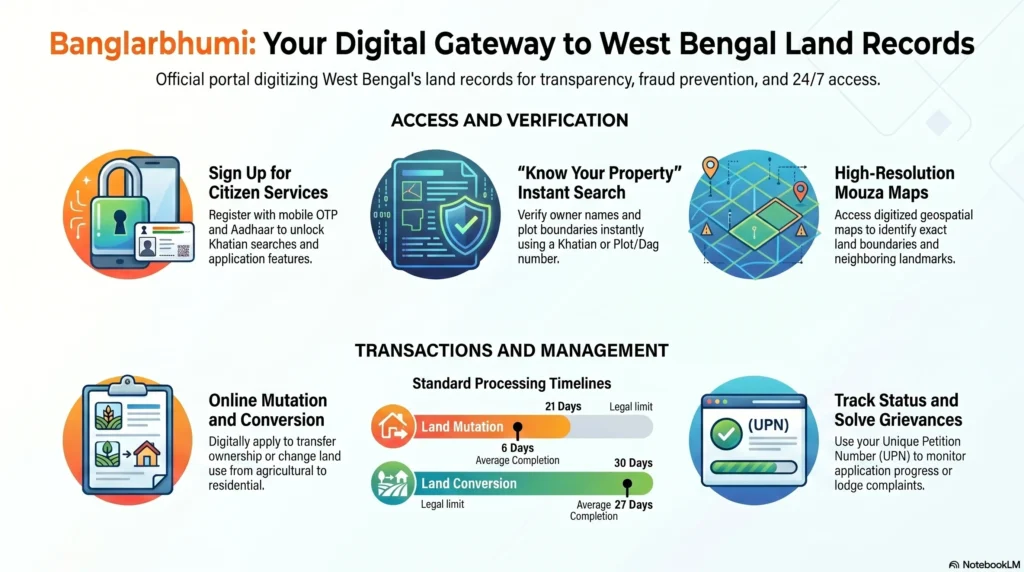
- On the homepage, click the ‘Know Your Property’ icon.
- Location Selection: Choose your District, Block, and Mouza (Village/Area unit) from the dropdowns.
- Choose Search Criteria:
- Search by Khatian: Enter the Khatian number to see all plots owned by a specific individual.
- Search by Plot: Enter the Plot number to see who currently owns that specific piece of land.
- View Data: Enter the Captcha and click ‘View’. You will see the owner’s name, the area of the plot, the classification of the land, and any “encumbrances” (legal notes) recorded.
Query Search: If you have an existing application number (Query Number) for a deed registration, use the ‘Query Search’ button to see the status of that specific transaction and the year it was queried.
Land Mutation: A Complete 2026 Online Guide
Mutation is the most critical step after buying property. Without it, the government still recognizes the previous owner as the taxpayer and legal title holder.
The 2026 Process:
- Login: Enter your Citizen credentials.
- Navigate: Go to ‘Citizen Services’ > ‘Online Application’ > ‘Mutation Application’.
- Particulars of Applicant: Fill in your details. If there are multiple buyers, they must be added one by one.
- Particulars of Transferer: Enter the details of the seller as they appear on the registered deed.
- List of Enclosures: You must upload the Registered Sale Deed and a Self-Declaration form (available in the ‘Downloads’ section).
- Constraint: Documents must be in PDF format and strictly under 2 MB.
- Submission: After hitting ‘Submit’, a Case Number is generated.
Automatic Mutation and Objections: In 2026, some systems enable “Automatic Mutation” if no objections are filed during the public notice period. However, if a third party files an objection, the process is paused for legal hearings at the BL&LRO.
Correct Tracking (Don’t Get Lost):
- To check by Application Number: Go to ‘Mutation Status’ (Search by Case, Deed, or Name).
- To check by Land Unit: Go to ‘Mutation Plot Khatian Status’ (Search by Plot or Khatian). This will show the Case Number, Buyer’s Name, and current status (e.g., Pending with BL&LRO).
Paying Khajna (Land Revenue) and Other Fees
The portal integrates with the GRIPS (Government Receipt Inventory System) for all financial transactions. The system now features automatic fee calculation, which prevents human error and overpayment.
The Payment Workflow:
- In the ‘Online Application’ menu, select ‘Fees Payment’.
- Select the Request Type (e.g., Mutation, Conversion, or Land Revenue).
- Enter your Application Number. The system will pull the data and display the Royalty Amount, Cess, and DMF Amount (for brick fields/mining).
- Payment Tiers: Fees are not uniform. Agricultural land in rural areas is the cheapest, while commercial land within KMDA (Kolkata Metropolitan Development Authority) limits attracts significantly higher rates.
- Recovery: If you lose your receipt, use the ‘Application No. Recovery (Khajna)’ tool under the ‘Online Service Status’ menu.
Land Conversion and Application Forms
Changing the land use classification (e.g., Sali to Bastu) requires a formal conversion application. This is a common requirement for developers building on former agricultural plots.
Key Requirements for Conversion:
- Sketch Map: This must show the property, its surroundings, and the specific entrance from the road.
- NOC from Pollution Control Board: Mandatory for industrial conversions to ensure environmental compliance.
- Affidavit: If you are converting a water body, you must provide an affidavit stating you will create compensatory water resources elsewhere.
- Recent RoR: An up-to-date Porcha must be attached.
Downloads Section: Visit the ‘Downloads’ section to find Form 1(D) (for Post-facto conversion) and templates for the required Affidavits. All forms are available in English and Bengali to ensure accessibility for all citizens.
Banglarbhumi on the Go: Using the Mobile App
The Banglarbhumi Mobile App (available on Play Store/App Store) is the perfect companion for field visits.
Mobile-Exclusive Advantages:
- Real-Time Status: Track mutation cases via push notifications.
- RS-LR Information: Instantly compare Revisional Settlement (Old) and Land Reform (New) data while standing on the plot.
- PDF Access: Download and view the RoR or Mouza Map directly.
- GPS Integration: Some versions allow you to identify plot details based on your current physical location using your phone’s GPS.
Official Banglarbhumi Portal vs. Third-Party Sites
Many private portals like MagicBricks or Housing.com offer property listings, but they cannot replace the Banglarbhumi portal for legal verification.
| Feature | Official Banglarbhumi Portal | Third-Party Property Portals |
| Data Source | Direct Government Records (L&LR Dept) | User-generated / Aggregated Listings |
| Legal Validity | Certified copies are legally binding | No legal standing in court |
| Lead Intent | Administrative / Public Service | Transaction-driven / Lead Generation |
| User Trust | Highest (Official Authority) | Variable (Potential for fake listings) |
| Traffic Engagement | Avg. Visit Duration: ~9:40 Minutes | Brief (Scroll and Click) |
Consultant Insight: While property portals are great for finding “opportunities,” the Banglarbhumi portal is where those opportunities are “verified.” Always trust the government data for the final decision.
Troubleshooting Common Access Issues
Technical issues can be frustrating, but they are often easy to solve if you know the “Pro-Tips.”
- “No Records Found”: First, check for data entry errors. If the details are correct, the plot may not have been digitized yet. You must visit the BL&LRO with your physical deed to request manual digitization.
- OTP Issues: If you aren’t receiving the OTP for Aadhaar linking, ensure your mobile number is active in the UIDAI database.
- Browser Compatibility: The Banglarbhumi portal is best viewed in Mozilla Firefox 66.0.3 or above. Avoid using outdated mobile browsers for financial transactions.
- Slow Loading: Clear your Browser Cache or try during off-peak hours (before 9 AM or after 9 PM).
Public Grievances: How to File a Complaint
If there is a spelling error in your Khatian or a delay in your mutation, do not ignore it.
- Click ‘Public Grievance’ on the homepage.
- Select ‘Grievance Application’.
- Fill in the details, describe the error (e.g., “Father’s name misspelled”), and submit.
- You will receive a UPN (Unique Petition Number). Use the ‘Grievance Status’ menu to track progress. Most clerical errors are resolved within 15–30 days through this route.
Conclusion: The Power of Transparent Land Ownership
The Banglarbhumi portal has revolutionized the West Bengal real estate market. By providing real-time data and a transparent “Record of Rights,” it has significantly reduced the risk of land-related fraud. Whether you are using the portal for a simple plot search or a complex land conversion, the power is now in your hands. This digital shift ensures that every citizen can protect their most valuable asset—their land—with confidence and legal clarity.
Frequently Asked Questions (FAQs)
Is mutation mandatory for flats in housing societies?
Yes. Even if the society has its own internal records, mutation in the government land records is essential to update public tax and legal records. Without it, official ownership is not recognized for taxation.
How long does the mutation process take?
Typically, it takes 30 to 60 days. However, it can be delayed if documents are mismatched, clerical errors are found, or if third-party objections are raised during the notice period.
What happens if a third party files an objection?
The mutation process is immediately paused. Authorities will schedule legal hearings where both parties must present their evidence before a decision is made.
Can I use digital copies of the RoR for court cases?
Yes, Certified Digital Copies downloaded from Banglarbhumi carry the same legal weight as physical copies and are recognized by all Indian courts and financial institutions.
Is the mutation fee the same for all types of land?
No. Fees vary based on land type (Agricultural vs. Commercial) and location (Rural vs. Municipal/KMDA areas).
Why are mutation applications sometimes delayed after submitting all documents?
Delays are usually caused by pending verification by revenue officials, clerical backlogs, or the mandatory public notice period where the department waits for potential objections.
Disclaimer: This guide is for informational purposes only. Banglarbhumi.gov.in is the only official government source for West Bengal land records.